WooCommerce Products Wizard
Composite Product Configurator & Builder

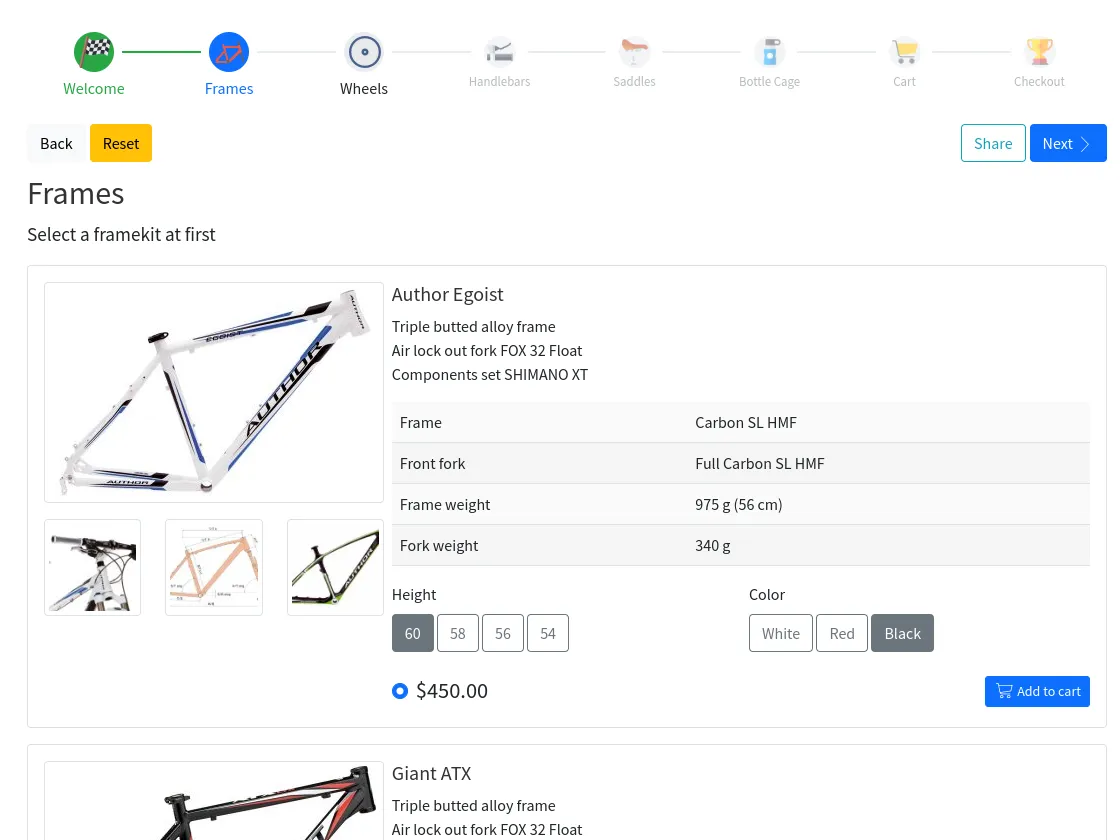

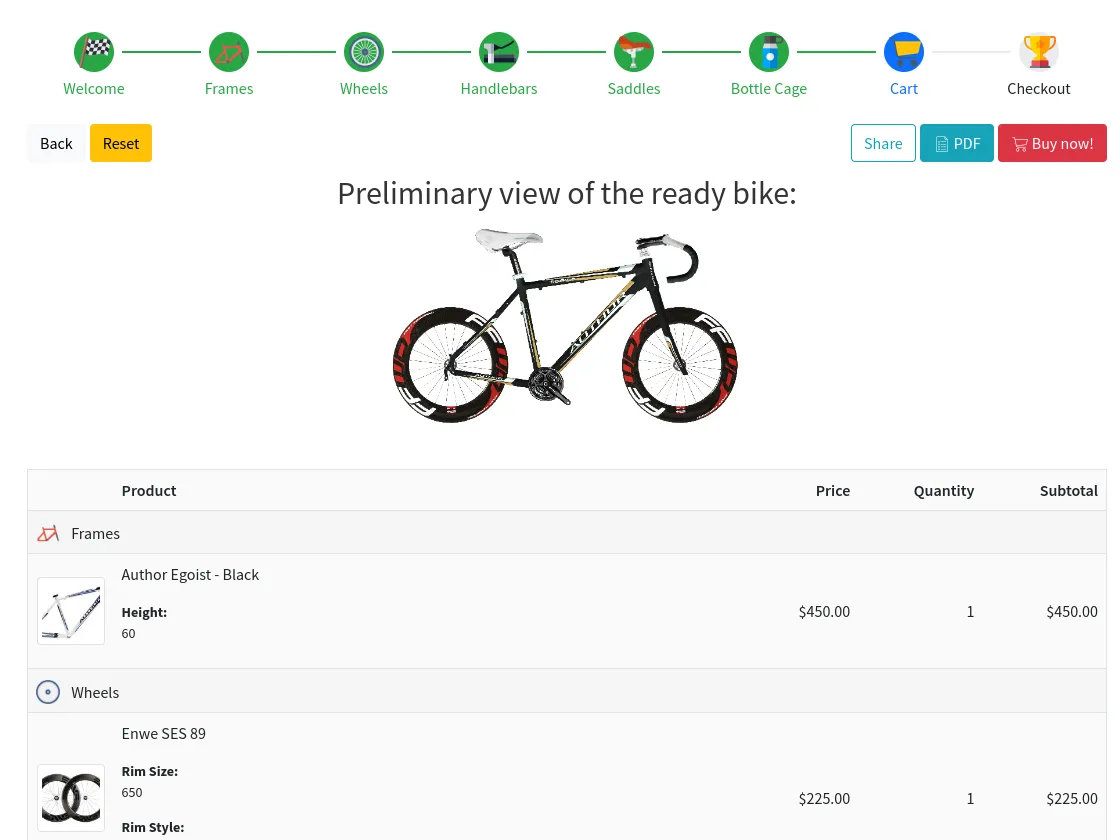
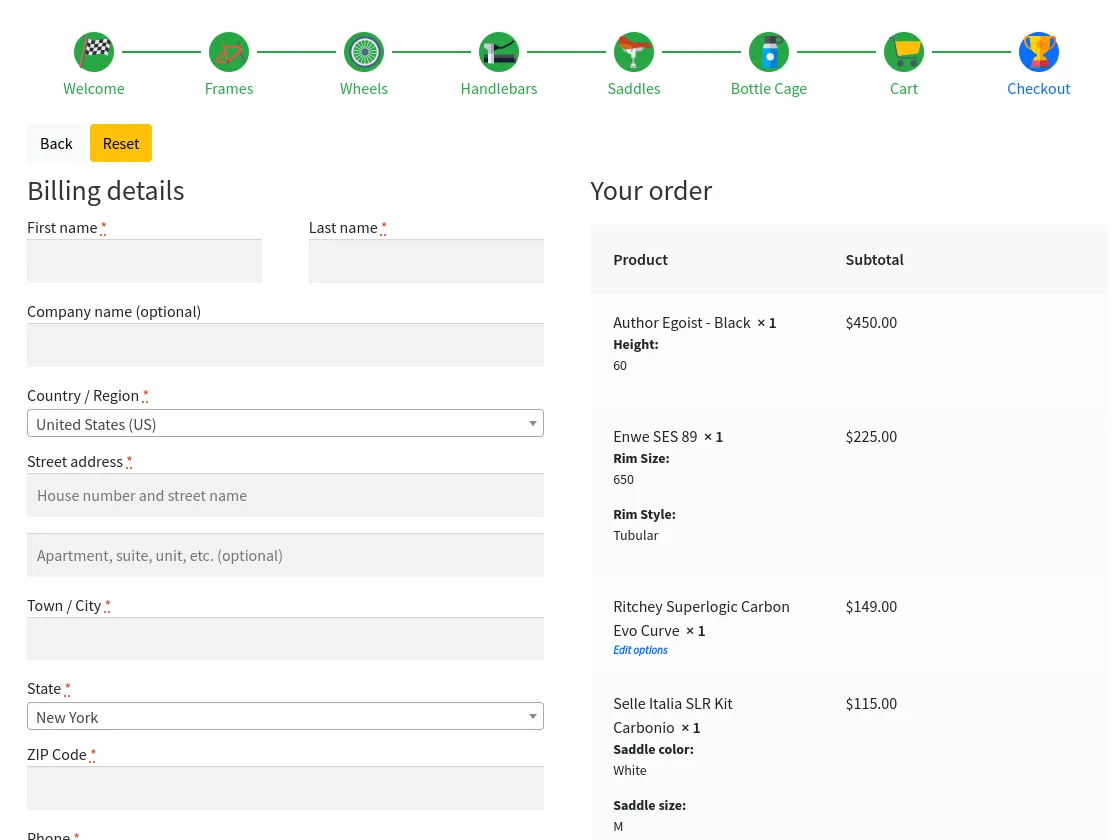
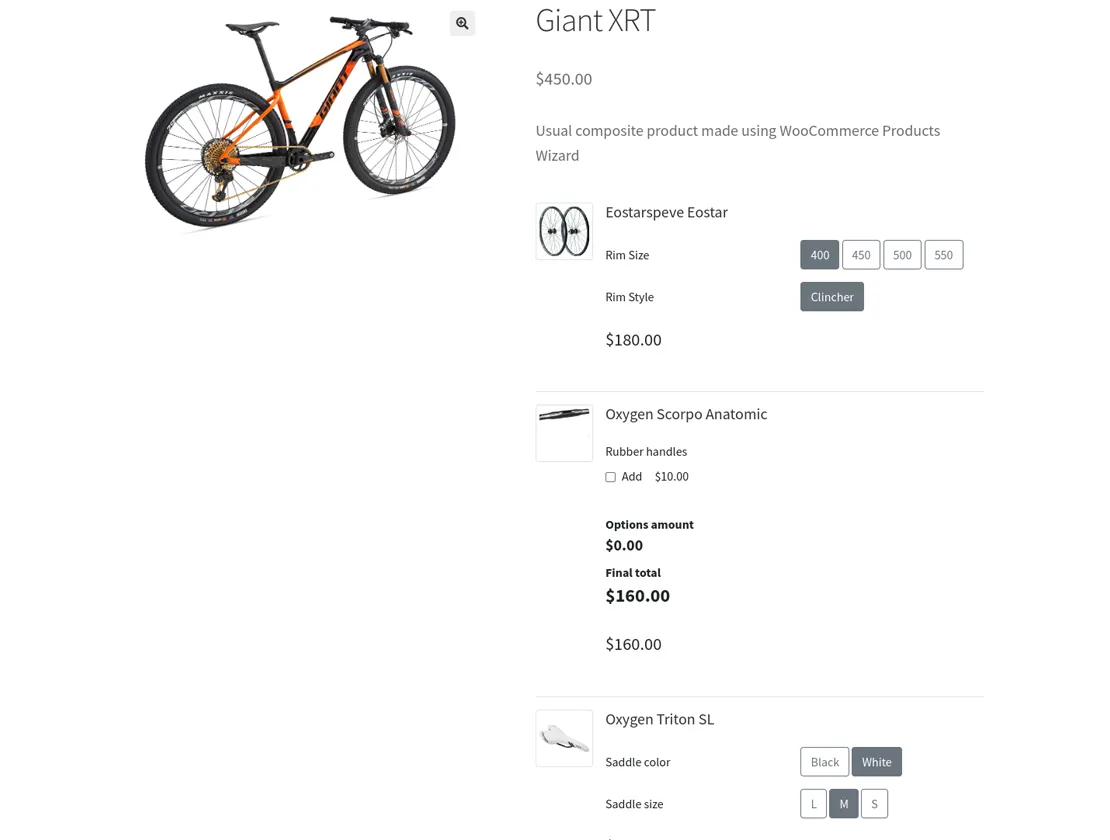
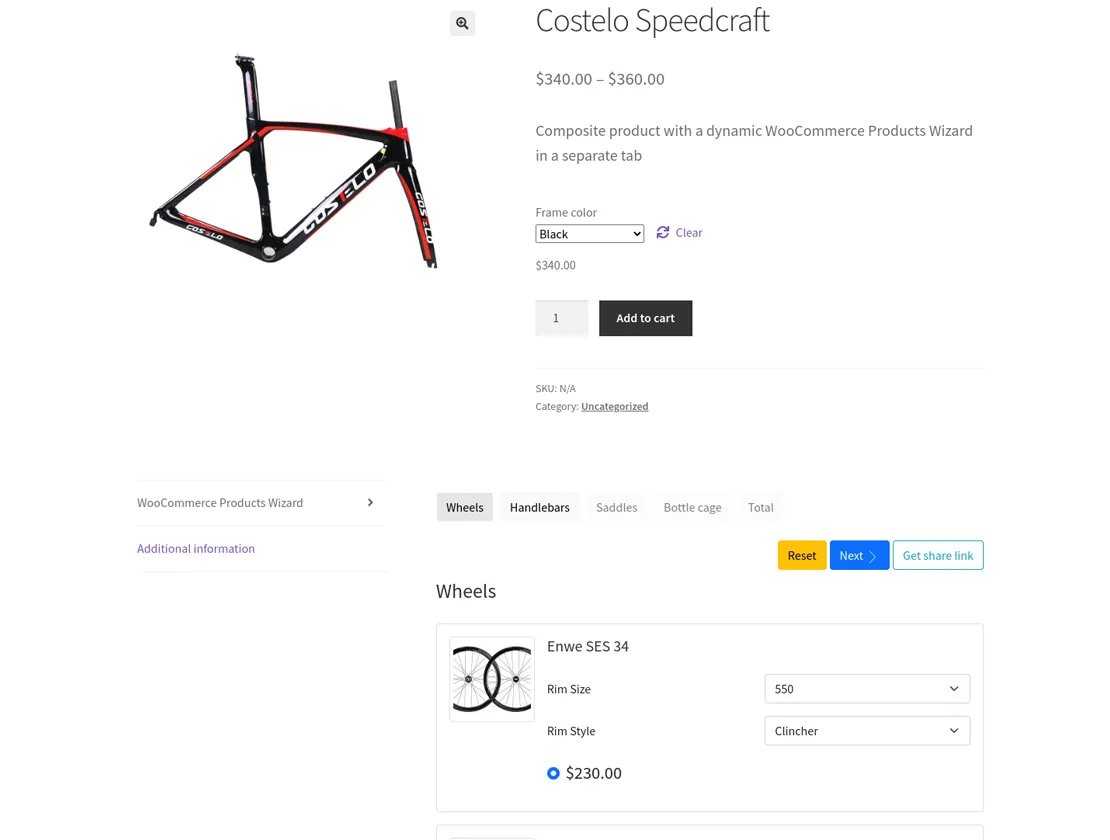
MultiStep Product Configurator for WooCommerce with all features you’d want to have
BOOST YOUR SALES selling bundles of products that fit each other
More than half of the customers have difficulties choosing products from plenty of stock and need help with it.
Bundle sales make the process easier and faster for a customer and make them happier giving them a bundle-discount and helping to make the right choice. At the same time, it allows for increasing the number of sales on the site.
The WooCommerce Products Wizard plugin enables mass-customization features for your store and gives your customers the opportunity to personalize their purchase using the product builder.

Enhance customers’ shopping experience:
- Enable customers to configure and build products that fit their requirements
- Simplify the way your customers buy complex, customized products
- Offer “build-a-box” features on your WooCommerce store
Get a solution for any business-case with only one tool!
Use-cases for your shop:
Software bundles
Personalized dishes
Customized services
Furniture configuration
Custom technics or mechanisms
And anything you can imagine within the plugin!
1000+ sites are using the wizard to provide a better service! Are you in?
Shopping features
Allow your customers to build a custom product
Give your customers the opportunity to personalize their purchases using the smart and flexible product builder. That will help them to create their best bundles and boost sales on your site.
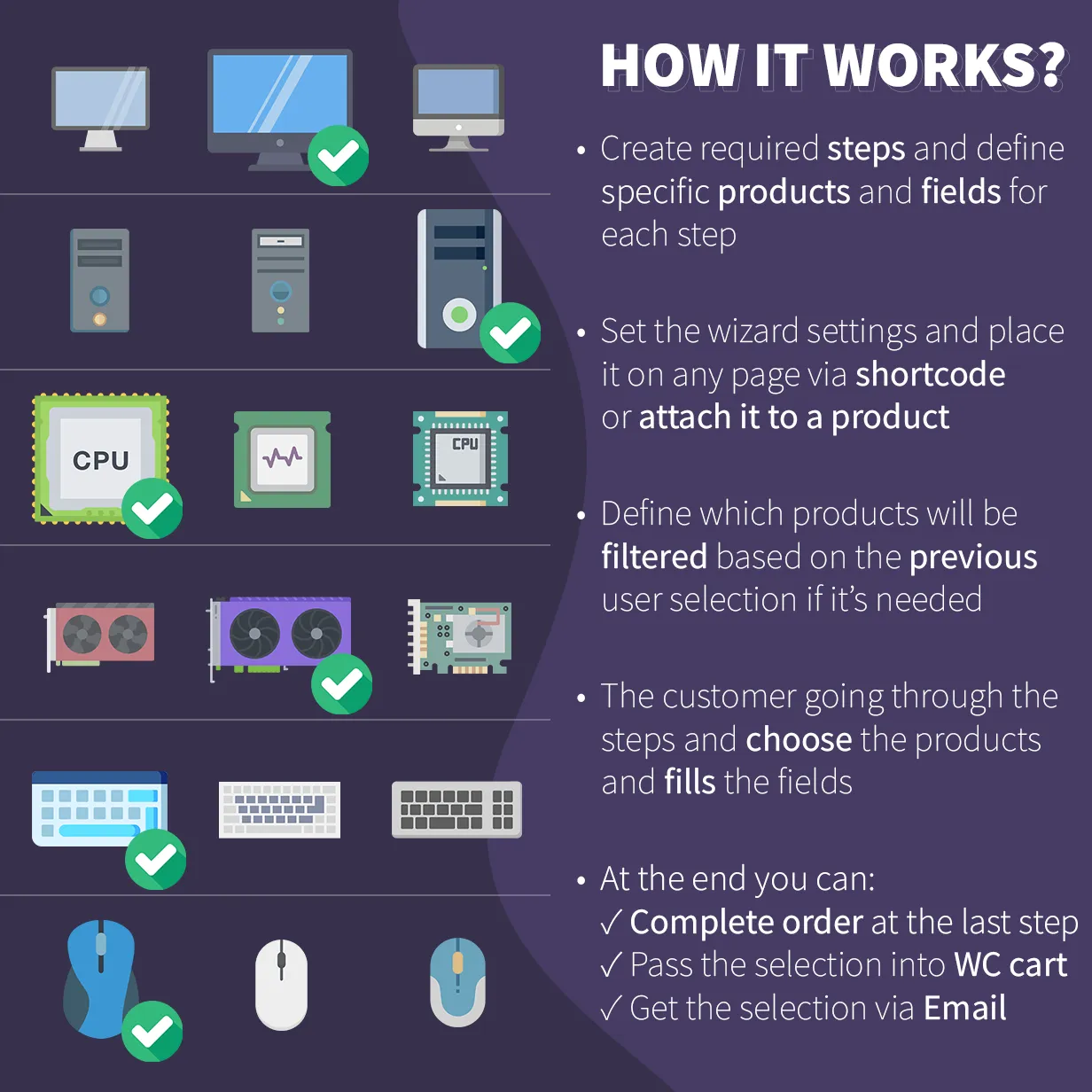
Unlimited number of steps with own content, view, settings, and rules
Each step has its own separate settings. Set name, description, thumbnail, cart restrictions, and other settings of the step. Select the best view for products requested within or leave it without products at all but only description and custom fields if you need. Create any number of steps you need.
Different workflow modes: step tabs, single screen, and other
This is possible not only to output the wizard as a step-by-step module. All steps can be available at once on one screen or appear consistently after each step selection. Moreover, there are step-by-step modes: strict going thought steps or the possibility to jump to any step.
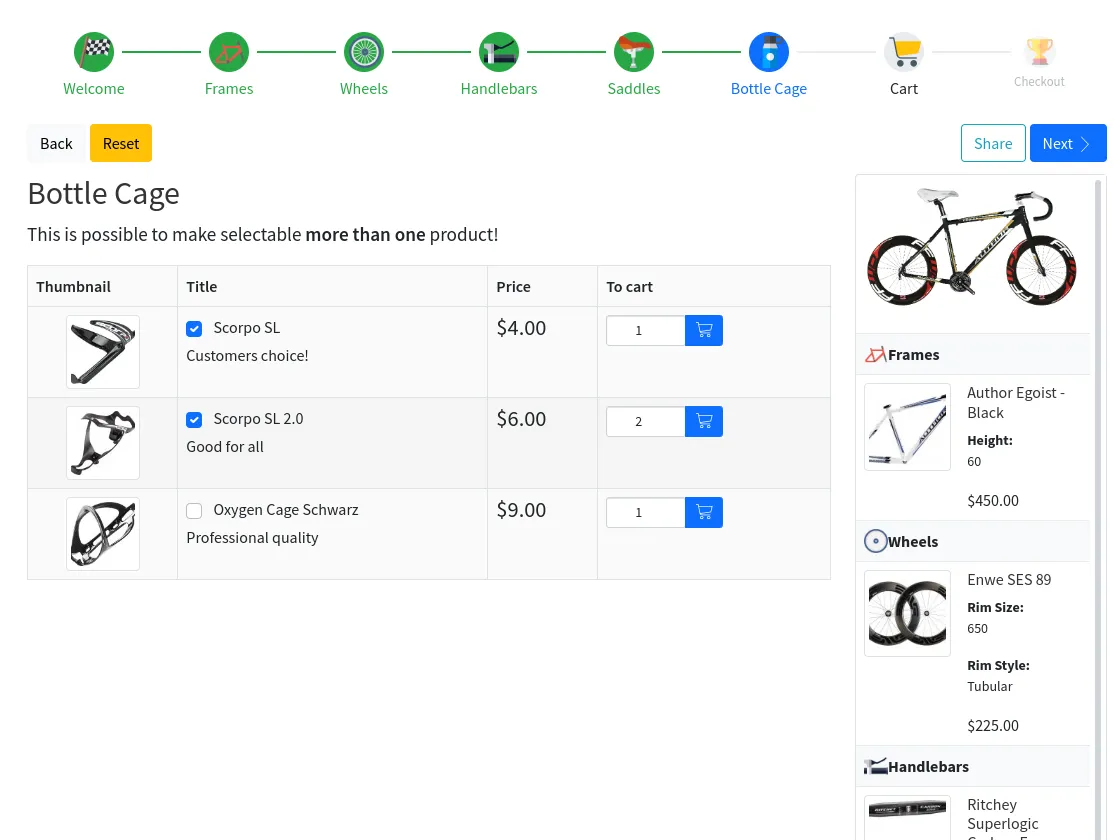
Allow selecting one or many products from a step
Not only one product can be selected per step. This is possible to select a few ones and add min/max quantity limit rules to be sure the required number of products are selected.
Place wizard on a separate page or attach it to a product
You can use the wizard as an independent block on any page - just place its shortcode whatever you need. Or you can attach the wizard to a product or all products of a category. This way the product has the wizard on its single page and will work as a composite product. Current wizard selection will be attached to the parent product as its children.
Combine products into a single kit if you need
To not confuse products after passing them from a wizard to the main WooCommerce cart, use the possibility to build kits that will be shown as an indivisible cart item made of selected products.
Get product requests via email with a selection PDF file
If you don't need the default WooCommerce checkout process to get customer orders just use a contact form to collect emails with customer data and attached customizable PDF file. You can send the same email to the customer also.
Collect custom order data from customers using HTML fields
Usually, you need to get some extra data of the built kit, like a number, text, attached file, and so on. You can add fields to a step by native plugin possibilities or use WooCommerce Extra Product Options to have fields individually for products.
Apply a flexible discount for products bought using a wizard
You can include buying more products with an extra discount for wizard use. This is possible to set a whole selection discount in percents or define each product or category discount separately. It can be set in percentage, like 10% of the current price, fixed, like -$10, or precise price, like =$10.
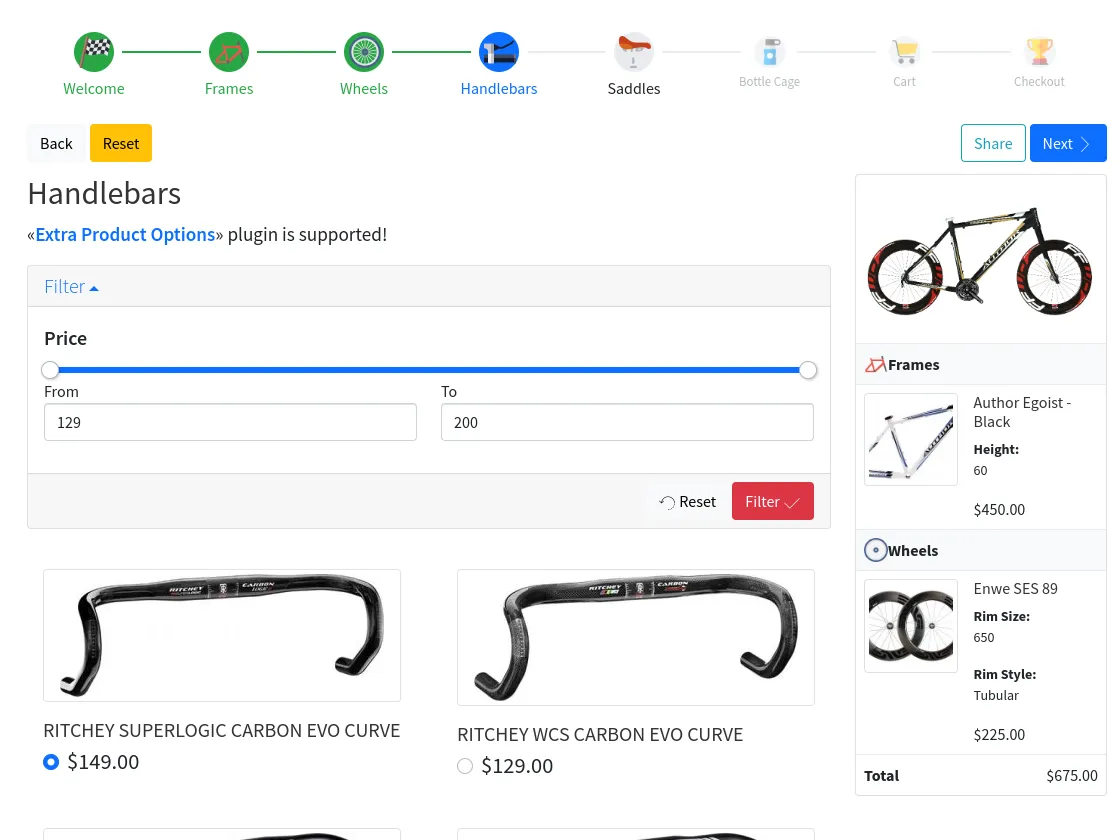
Generate the thumbnail of the ready product
Use wizard as a visual product configurator. You can prepare a thumbnail canvas to generate and show how the current customer selection will look like. That might be useful for a custom clothes builder or similar. Customers will see the thumbnail changes at each step.
Video manualSet availability conditional rules for products or steps
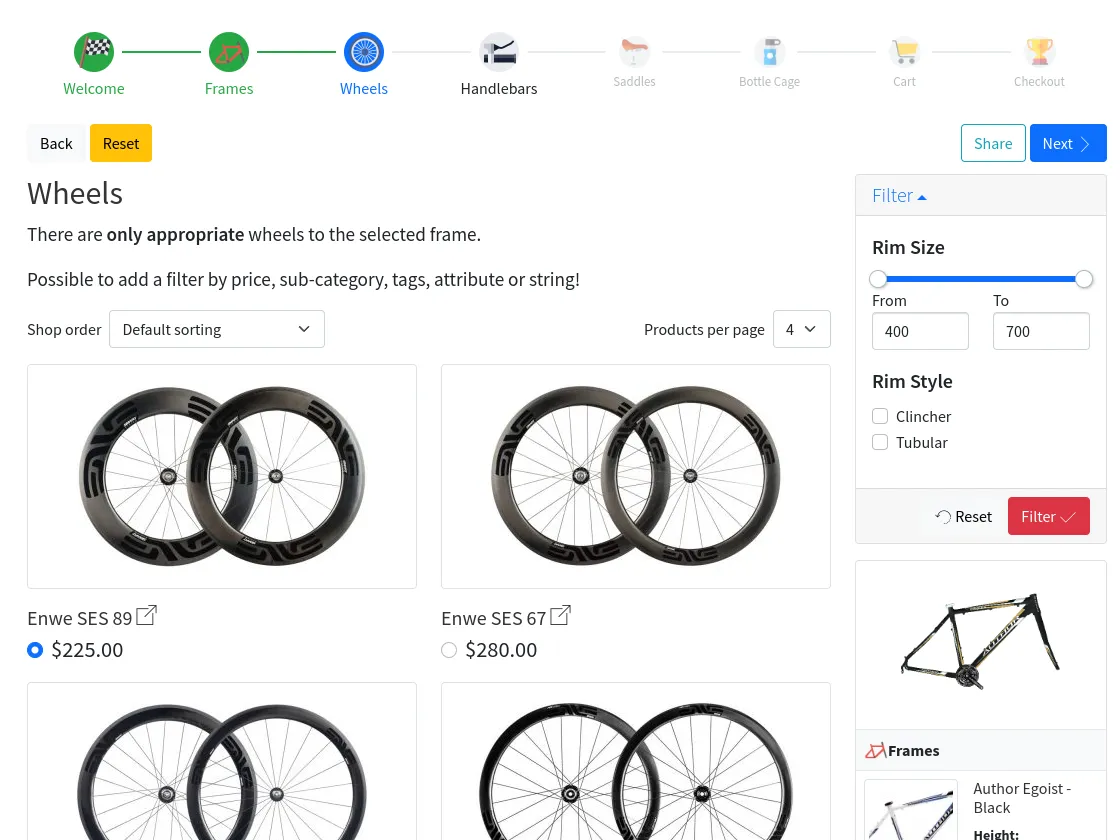
Some of the products, like bicycles or PC parts, can't be compatible with each other. Set any availability rules for steps or products to be sure your customer will have only fitting parts according to his current selection.
Add product filters within the steps
If some of the wizard steps have really a lot of products you can help your customer to find the best product using inner step filters. There are no limits to their number. They can be based on attributes, categories, tags, or price and have according to view from a drop-down input to a range slider.
Set a pre-defined bundle of products for the first launch
You can create a wizard with pre-defined product selection to use it as a default pack or help your customer with the right choice.
How it's made
WooCommerce Products Wizard is made with love and according to the needs of the real customers.
Started as a tiny script with the only function in 2015, after a lot of feedback, hard work, and regular improvements, the plugin has grown into a multifunctional tool for building WooCommerce composite products.
Most of the features were made jointly with the customers and for the customers!
Products Wizard won’t be a Super-Star of your online shop.
But it can make your online shop a Super-Star!
- Full Asynchronous Workflow
- No excess page refreshes while using the wizard.
- Responsive Design
- Fits any device screen size.
- Completely Internationalized
- Translate any text string from the admin part. Also, plugin will output elements correctly for any language and writing direction.
- Accessibility Friendly
- Works comfortable for any type of devices and manipulators.
- High-organized And Customizable Code
- Expand the wizard functionality with your own keeping the plugin pure and updatable.
- Easy Templates Customization
- Customize the wizard HTML parts with no headache via the admin part.
- High-performance Re-styling Approach
- Re-build the wizard styles file with own colors and properties right from the admin part. Use any from 25 Bootswatch themes as a styles-preset.
- Adopts Bootstrap-based Themes
- The wizard can use your bootstrap-based theme style to be better integrated into your site.
- Modern JavaScript Code
- Clear ES6 modules code for development and bundled one for production.
- Works Without Javascript Even
- The wizard uses fail-safe technologies to work in any environment and situation.
- No AI/GMO code
- All plugin code is carefully made by hand and not by accident.
- AUTO-UPDATES
- Get the latest plugin version using the native WordPress functionality.
Compatible plugins:
- WooCommerce Step Filter;
- WooCommerce Extra Product Options (check the documentation);
- WooCommerce Subscriptions.
- PHP version
- 7.4 or higher
- WordPress version
- 4.5 or higher
- WooCommerce version
- 2.4 or higher
Only logged in customers who have purchased this product may leave a review.
I want to collect custom data from users (text or file)
There are two ways to achieve this. Both of them have their own pros and cons.
- Extra Product Options plugin
- Step custom fields
I want to get products selection via email
This is possible to do. Select a ContactForm7 for use on the results step of the wizard. The email will have an attached PDF file of the user selection.
Online documentation about it
Can I duplicate the wizard with all its settings?
Yep! Here is a free super helpful Post Cloner plugin to do the trick
Can I translate the plugin?
All of the wizard UI strings can be translated/modified via the admin part for every wizard independently.
To translate the admin elements of the wizard use any 3rd-party plugin. For example, Loco Translate.
To translate the admin elements of the wizard use any 3rd-party plugin. For example, Loco Translate.
Does this plugin handle stock status of each product individually?
Yes, products stock bought via the wizard will be reduced accordingly
Is this possible to make products dependable on each other?
This is possible using the unified "Availability rules" setting for steps, categories, products, or variations.
Online documentation about it
Online documentation about it
Is there a way to filter steps based on the user’s choice from the previous step?
The same as for dependant products, there is the unified "Availability rules" setting for steps.
Online documentation about it
Online documentation about it
The wizard doesn’t want to move further through the steps
Some server configurations might have problems with the current session storing. Mostly the "Store session in the DB" setting fixes this problem.
The wizard looks workable, but returns a static or random output
Much probably you're using a caching plugin on your site which makes page content freeze and the wizard output also. In this case, tick the "Send current state hash via AJAX" global setting to change the page URL for each wizard's state. Mostly, that will help to solve the problem.
Wizard removes the selected products while I go back the steps
The default behavior of the wizard is to remove the products from the steps after the active one. To avoid this, disable the «Strict cart workflow» setting.
Product thumbnail opens a new page instead of a lightbox
Install any good lightbox plugin which supports AJAX actions. For example Responsive Lightbox & Gallery
# 12.1.1 - 2026-03-16
## Fixed:
- Lost discounts of PDF total rows
- Lost generated thumbnail

# 12.1.0 - 2026-02-17
## Added:
- Multilingual addon support
- Wizard step "Enabled" setting
- Bulk edit for products settings

## Fixed:
- Apply products discount while PDF generation
- Custom styles generation bugs
- EPO init after applying a filter
- WooCommerce Step Filter bug of result products
- Session storage issue

## Changed:
- Migrate to Bootstrap v5.3.3

= 12.0.0 =
Tweak: Shorten "woocommerce-products-wizard" class to "wcpw"
Removed: Kit price settings
New: Total rows settings
New: Price control
New: Availability rule source types
Removed: Wizard min/max products selected/quantity/price settings
New: Cart rules setting
New: Step cart rules setting
New: Step progress settings
New: Attached wizard place setting: custom action and modal
Removed: Result PDF header/footer height settings
New: Result PDF spaces setting
Removed: "All/No selected items by default" settings
New: "Selected items by default" unified setting
New: WooCommerce brands support
New: "Submit on choose" step setting
New: "Submit on variation property change" step setting
Tweak: Keep kit base product default price
Tweak: Boost step product requests
Tweak: WooCommerce Step Filter v11.0.0 compatibility
Tweak: "Show steps in cart" setting refactoring
Tweak: Code improvements
Removed: Deprecated code lower v10.1.0

= 11.6.0 =
Removed: "Show progress" setting
New: Progress and panel navigation views
New: Navigation subtitle settings
Tweak: Navigation views refactoring
Tweak: Dynamic active step improvements
Tweak: Pass product price into the attached wizard initially
Fix: Product with an attached wizard price bug in WC cart
Fix: EPO file upload field bug

= 11.5.1 =
Tweak: Output success message after add-to-cart and repeat action
Fix: Step filters view saving bug
Fix: Negative backorders product quantity bug
Fix: Product cart controls bug

= 11.5.0 =
New: "Hide if have no products" step setting
New: Thumbnail generator area notes and locked settings
New: Share link type setting
Tweak: Migrate from 12 columns template grids to flexible CSS values
Tweak: Output filters before results of WooCommerce Step Filter
Tweak: Possibility to update existent entities while import
Tweak: Code improvements

= 11.4.0 =
New: Generated thumbnail areas rotation
Tweak: WooCommerce High-Performance order storage (COT) compatibility
Tweak: Migrate from bootstrap modals to dialog element
Tweak: Scripts optimization
Tweak: Code improvements and fixes
Fix: Force replace state with share link
Fix: Spinner output with custom styles bug
Fix: Product level thumbnail generation bug
Fix: Product variation template setting bug
New: ES modules of source scripts
Removed: Included scripts setting
Removed: noUiSlider script

= 11.3.0 =
Fix: Discount rules of product bond to a wizard
Fix: Availability rules storing within dynamic tables bug
New: Wizards export/import feature with demo preset
New: Generated thumbnail area wizard to apply setting
New: Sharing of WooCommerce Step Filter with "Use filters of a step" setting
Tweak: Better compatibility with WooCommerce Step Filter
Tweak: Better implementation of product gallery for touch screens
Tweak: Code improvements and fixes
Removed: Deprecated stuff from v4.x
Removed: FormData JS polyfill

= 11.2.0 =
Fix: Combined kit totals bug with the root product quantity more than 1
Fix: Immediate add to cart a multistep wizard with default cart content bug
Fix: Applying product discounts for independent used variations bug
Fix: Rare bug of PDF images with get attributes in link
New: Cart share URL shortcode
New: Navigation button class setting
New: Availability rules for discount settings
New: Price discount using setting
New: Maximum products number step setting
New: "Show progress" step setting
New: Close button for widget mobile view
New: Spinner with loading progress bar
Tweak: Availability rules for thumbnail ares settings instead of one rule
Tweak: EPO with "Add to cart by quantity" setting bug
Tweak: Product price sorting according to the current discount
Tweak: Reset attached step filters while wizard reset
Tweak: Possibility to use kit base price for all types of kits
Tweak: Possibility to store step inputs for all types of kits
Tweak: "Save" and "Save & Close" step settings in admin part
Removed: Legacy code lower v10.0.0

= 11.1.1 =
Fix: Sticky element settings bugs
Fix: Long pagination on a mobile screen bug

= 11.1.0 =
New: Sticky header/navigation/footer/widget offset setting for different screen sizes
New: Extend sticky header/navigation/footer/widget settings
New: Pass attached product price to the wizard totals
Fix: EPO fields appearance while adding step input to cart
Fix: Enqueue only EPO styles while ajax requests
Fix: Kit base product setting work in admin part
Tweak: Scroll to not-sticky widget on toggle
Tweak: Don't apply wizard discount for products with an attached wizard
Tweak: Output product variations with available attributes
Tweak: Strict scrolling top possibility

= 11.0.2 =
Fix: Generated thumbnail canvas admin bug
Fix: "To results" button appearance bug
Fix: Subscription products price output bug
Fix: Custom styles generation bugs
Tweak: Documentation update

= 11.0.1 =
Fix: Wrong totals with the applied discount
Fix: Apply discount with EPO paid options
Fix: Apply discount with the step filter using
Fix: Show sidebar setting bug
Fix: Admin part setting fields bug

= 11.0.0 =
Removed: Controls sorting setting
Removed: Deprecated stuff from v3.x
New: WooCommerce Step Filter integration
New: Filter product variation attributes by requested step attribute availability rules
New: Header/footer controls settings
New: "Reset on showing" setting
New: "Show progress" setting
New: Step input value using for min/max step rules
Tweak: Better work with the browser history
Tweak: Use "Final redirect URL" setting for attached wizard
Tweak: Refactoring of the product attributes field for availability rules setting
Fix: Steps availability rules with strict cart workflow bug
Fix: Widget/results discounted totals bug
Fix: Price bugs with multi-currency plugins
Fix: Variation attribute value with double quotes bug

= 10.8.0 =
New: Apply Bootswatch theme setting
New: Controls sorting setting
New: Sticky header/navigation/footer setting for different screen sizes
Tweak: Better wizard sharing functionality
Tweak: Small code improvements

= 10.7.0 =
New: Expanded sequence mode
New: Product item view type 10
Tweak: Possibility to include only specific variations for a step
Tweak: More flexible product/variation/category/attribute availability rules
Fix: Widget variation attributes style bug

= 10.6.0 =
New: Default active step setting
New: "Save beyond steps" default cart content setting mode
New: Product price special shortcode for individual controls
New: Carousel layout
Fix: Don't add base product in the cart while editing
Fix: Collapsing elements state saving bug
Tweak: Code improvements and fixes

= 10.5.0 =
New: More flexible product/variation/category wizard discount
New: "Step inputs price" setting
New: "PDF file name" setting
New: "Filter auto-submit" step setting
New: "Show table layout columns" settings
New: "Show results table columns" settings
Fix: API work bug
Fix: Removing cart product reflection bug
Tweak: Step-input shortcode multiple values support
Tweak: Code improvements

= 10.4.0 =
New: Sticky footer setting
New: Cart total price special shortcode for the widget-toggle button
New: Thumbnail generation settings for product attributes
New: Availability rules for thumbnail areas
New: PDF new page shortcode
New: Main section and sidebar class settings
New: Toggle widget on screen size setting
Tweak: "Use filters of a step" setting work improvement
Tweak: The same behavior of remove/edit controls for widget/results
Tweak: "Apply to all steps" checkbox for step settings
Tweak: Better price discounting for variable products
Tweak: Code improvements
Tweak: Documentation update
Fix: Price discount bug of variable products
Fix: Min/max step rules work with single-step modes

= 10.3.0 =
New: "Save state to URL" setting
New: "Share" button
New: Select tag support for custom inputs
New: "No products until filtering" step setting
Tweak: Assets enqueue improvement
Tweak: Small code improvements
Fix: Custom style color issues
Fix: Translation source bug

= 10.2.0 =
New: Filter settings: "Order", "Order by", "Add empty value"
New: "Use filters of a step" setting
New: "Active step ID after wizard redirect" product/category setting
New: "Make nonblocking requests" step setting
New: Product item view type 9
New: Step toggle button for single-step modes
Fix: Excess wizard data in customer emails

= 10.1.1 =
New: Product variation reset button
Fix: ContactForm7 multiple files attachment bug
Fix: PDF bugs with PHP v8
Fix: Order item excess children info bug

= 10.1.0 =
New: "Merge with the previous step" step setting
New: "Show minimum products selected placeholders" step setting
New: "Filter search by" step setting
New: "Filter search results dropdown" step setting
New: "Toggle navigation to mobile on screen size" setting
Fix: Applying the default filter values for the price filter bug
Fix: EPO attached products with inner checkout step bugs
Fix: "Dynamic Pricing & Discounts" plugin within a wizard bugs
Tweak: Better scroll top setting work with the sequence mode
Tweak: Code improvements

= 10.0.0 =
Removed: Global individual controls settings
New: Step individual controls settings
New: "Attach results PDF to the root product" kit setting
New: "Widget toggle" button
New: Result PDF additional CSS setting
New: Sticky nav setting
New: Templates customization admin tool
New: Line horizontal nav view
Tweak: Line nav refactoring
Tweak: Possibility to output ContactForm7 fields in the PDF file
Fix: Inner checkout step with cart reflection bug

= 9.10.0 =
New: Product thumbnail size setting
Fix: Step inputs bug
Tweak: Code improvements

= 9.9.0 =
New: "Apply default filter values" step setting
New: "Enable thumbnail link" step setting
Tweak: Visual improvements
Tweak: Using the uploaded images for thumbnail generation
Fix: Drop two outdated settings
Fix: Visually hidden elements bug

= 9.8.0 =
New: Edit kits in the cart possibility
Fix: Include/exclude terms bug for categories filter
Fix: Variation swatches image bug
Fix: Custom styles generation bug
Fix: Checkout step bug
Fix: Root product discounted price bug of separated kits

= 9.7.0 =
New: "Add to cart and repeat" button
New: "Show prices" step setting
Tweak: Migrate to Bootstrap v5
Tweak: More products grid layout breakpoints
Fix: Simple product with an attached wizard add-to-cart event bug
Fix: Wrong "Reflect in the main cart" setting behavior
Fix: Small admin bugs

= 9.6.0 =
Removed: Step description position setting
New: Step bottom description setting
New: "Attributes for using" step setting
New: Inner checkout step settings
Tweak: Admin UI improvements
Tweak: Wizard and Step IDs on in the admin order details
Fix: ContactForm7 v5.4 second mail attachment bug
Fix: EPO inline styles bug
Fix: EPO attached products bugs

= 9.5.0 =
New: "Expand widget by default" setting
Fix: "Scrolling top on the form update" with individual controls bug
Fix: Cart PDF product data line breaks bug
Fix: Combined kit cart price bug
Fix: ContactForm7 v5.4 bug
Tweak: Thumbnail generator next/prev area settings controls in the admin part

= 9.4.0 =
New: Skip child products count setting
Tweak: Sort filter values by the include setting
Tweak: Work boost
Fix: Better RTL support
Fix: Kit fixed price bug

= 9.3.1 =
Fix: EPO plugin better form validation
Fix: ContactForm7 v5.4 bugs
Fix: Text products filter bug
Fix: Small CSS improvements
Fix: Variable products discounted price output
New: Step filters default value

= 9.3.0 =
New: Navigate using steps in widget setting
New: Show header/footer settings
New: Hide edit/remove buttons for step individually settings
Fix: Taxes calculating bugs
Fix: Cart kit subtotal bug
Fix: Availability by an attribute bug

= 9.2.1 =
New: "To results" button behavior setting
New: Auto nav action setting value
New: Product attributes output possibility
Tweak: Filters work improvement
Fix: Quantity rules with several product variations bugs
Fix: Elementor preview bug
Fix: Prices including taxes bugs
Fix: EPO plugin pricing bugs

= 9.2.0 =
Fix: Breadcrumbs bug with an attached wizard
Fix: Combined kit price bug
New: Filter controls class settings
New: More step view settings
New: Masonry layout
Tweak: Bootstrap update to v4.6.0

= 9.1.3 =
New: Buttons nav list view
Tweak: Widget toggle control badge
Fix: Redirect to a wizard feature with AJAX add to cart action
Fix: Product category settings saving bug

= 9.1.2 =
Fix: Latest WooCommerce version combined kits bug
Tweak: Code improvements

= 9.1.1 =
New: Availability rules by product attributes
Fix: "Scrolling top on the form update" bug

= 9.1.0 =
New: "Send current state hash via AJAX" global setting
New: Step thumbnail settings
New: "Add to cart" button behavior value
Tweak: Code improvements
Fix: Results table mobile view
Fix: Mobile navigation work

= 9.0.0 =
Removed: All dependencies/exclusions settings
New: Unified availability rules setting for steps/categories/products/variations
New: File type support for custom inputs
New: Price discount type setting
Fix: Description step content tags wrapping
Fix: Better variations work
Fix: Better cart reflection work
Fix: "Add to main cart" button work

= 8.9.0 =
New: Thumbnail generation feature
New: Filters include/exclude terms setting
Fix: Bug of the emails sent
Tweak: Admin copy step possibility
Tweak: Code improvements

= 8.8.0 =
New: "Select several variations per product" setting
New: "Show steps names" setting
New: On/off sticky elements settings

= 8.7.0 =
New: Attach wizard to a product feature
Fix: Double discount rare bug
Fix: Products reflect in the main cart bugs

= 8.6.0 =
New: "Show steps names in cart" setting
New: Sidebar position setting
New: None navigation view
New: Categories dependencies setting
Fix: Inline custom fields work bug

= 8.5.0 =
New: Class settings for each main control button
New: Step id setting for redirect to a wizard feature
New: Min/max total products price setting
New: "Results tab description" setting
New: "Show results tab table" setting
New: More values for "Show sidebar" setting
Fix: Unmet product variations bug
Fix: "Hide prices" option with table view bug
Fix: Description tab content tags wrapping
Fix: Hidden product quantity work bug
Tweak: Total price including/excluding taxes
Tweak: Item description output for the table view
Tweak: Documentation update

= 8.4.0 =
New: "Add to cart by quantity" step setting
New: Form item title/price font size settings
New: "None" value for "Item description source" setting
Fix: Filter by categories bug
Fix: Filter inline-checkbox/radio views bug
Fix: Rear bugs

= 8.3.0 =
New: Nav action setting
New: "Products per page items" step setting
New: "Enable 'Order by' dropdown" step setting
New: "Filter position" step setting
New: More filter views
Tweak: Small code improvements

= 8.2.1 =
Fix: Icons bug with the custom styles file
Fix: Bootstrap 3/4 cross CSS grid bug
Tweak: Documentation update

= 8.2.0 =
Removed: Variable products without default selected variation
New: Admin custom styles settings
New: Pre-defined kit base product setting
New: Product tags output setting
New: Output product title link setting
New: "Don't add specific products to the cart" setting
New: "All items are selected by default" setting
Tweak: Hide out of stock items using product attribute filter
Tweak: "Selected items by default" setting variations support
Tweak: "Excluded products" setting variations support
Tweak: noUiSlider update
Tweak: Admin improvements and fixes
Fix: Products filter by category work bug
Fix: Individual cart controls bugs
Fix: "Don't add to cart" setting within kits using
Fix: Price range filter values bug
Fix: Bulk edit bug

= 8.1.0 =
New: "Hide choose element" step setting
Tweak: Clickable thumbnail of "type 5" item template
Fix: Drop steps on disable/enable the plugin
Fix: Rare PDF generation bug

= 8.0.0 =
Removed: Subtotal and discount rows from widget and results
New: Unlimited steps with any products within instead of just categories
New: Custom inputs in steps description
New: "Exclude already added products of steps" setting
New: "Merge thumbnail with gallery" step setting
New: "Kit base price" setting
New: Products/categories price discount rules
New: Product item view type 6
Tweak: Minimum/Maximum products selected/quantity rules based on one or multiple steps
Fix: Small admin improvements
Fix: Line nav view bug

= 7.0.0 =
Removed: "Enable all tabs availability" setting
Removed: "Enable single step mode" setting
New: "Mode" setting and new "sequence" mode
New: "Expand filter by default" step setting
Fix: "Store session in the DB" global setting initialization bug
Fix: Variation data pass bug
Fix: Combined kits quantity bug
Tweak: Code optimization

= 6.0.0 =
Tweak: Global API refactoring
Tweak: Better nav UI
New: Form item view with modal
New: Nav template setting and a few new templates
Fix: Rare product variation bugs

= 5.1.0 =
New: Images variations view
Fix: Multiple variation properties bug
Fix: Results PDF total pages bug
Fix: Minimum/Maximum total products quantity among pages bug

= 5.0.0 =
Removed: "Include full styles file" global setting
New: "Styles including type" global setting
New: "Store session in the DB" global setting
New: Filtering by a search string
New: "Excluded added products" term setting
New: "Kit price" for combined kits setting
Fix: Pagination with filters bug and among pages cart bug
Fix: Cross-terms filtering results bug
Tweak: Filter section toggling
Tweak: Code optimization and fixing

= 4.5.0 =
New: Results emailing settings
New: Buttons variations view
Fix: Sticky elements rare bugs
Fix: Extra Product Options with variable products init bug

= 4.4.0 =
Tweak: Migrate to Bootstrap v4
Tweak: Styles refactoring
Fix: "Skip" button appearance bug

= 4.3.0 =
New: Minimum/Maximum products selected setting
New: Minimum/Maximum total products quantity setting
New: Default product quantity setting
New: Image-radio/checkbox filter views
Tweak: Form notices and messages refactoring

= 4.2.3 =
Tweak: Code refactoring
Fix: Steps dependencies bug
Fix: Subscriptions fees pricing bug

= 4.2.2 =
Tweak: Performance optimization
Fix: Prematurely published table layout bugs

= 4.2.1 =
Tweak: Small code improvements
Fix: Subscription products choose bug

= 4.2.0 =
New: Discount setting
Fix: Extra Product Options with variable products bug

= 4.1.0 =
New: Selected items by default setting
New: Products exclusions setting
Tweak: noUiSlider update
Tweak: More reliable description editor in the admin part

= 4.0.0 =
Fix: Styles bugs
Fix: Stock bug with combined kits
Tweak: Code refactoring

= 3.21.0 =
New: "Add to cart" button behavior setting
New: More options for text strings
Fix: "Hide prices" option bug
Tweak: Templates improvements
Tweak: Code refactoring

= 3.20.2 =
Fix: Min products quantity check on product remove bug
Fix: Steps settings save bug

= 3.20.1 =
Tweak: Deep code refactoring
Fix: Min products quantity check on product remove
Fix: Max products quantity bug with the stock limit value

= 3.20.0 =
New: Edit cart item button
Tweak: Admin part updates
Tweak: Documentation update
Fix: Lost "remove cart item text" option bug

= 3.19.0 =
New: Min/max products quantity setting by another step's products in the cart
New: Min/max total products quantity setting
Tweak: Documentation update
Fix: Individual controls work bugs

= 3.18.0 =
New: Min/max selected products setting by another step's products in the cart
Fix: After product remove bug
Fix: Min/max selected products calculation bug
Removed: Deprecated numeric grid layouts and excess template settings

= 3.17.0 =
Fix: Individual controls in the single step mode bugs
New: Bulk dependencies edit
New: "Hide prices" option
Tweak: Code refactoring

= 3.16.0 =
New: Redirect to the wizard on product add to WC cart option
Fix: Tabs order bug with WC v3.6.1
Fix: EPO plugin files upload better support

= 3.15.1 =
Tweak: 4.8.4 EPO plugin version support
Tweak: Better cart reflections work

= 3.15.0 =
New: Combining products in the kits option
New: Order products by price
Fix: Single step layout widget bug
Fix: Losing products from the other pages bug

= 3.14.0 =
New: Bootstrap 4 framework support
New: Product "Update" button
New: "Don't add products from this step to WooCommerce cart" option
Fix: "Extra Product Options" bug with validation and conditions
Fix: Filter reset on adding/removing a product
Tweak: Widget position on mobile
Tweak: Documentation update

= 3.13.0 =
New: "Item description source" setting
New: Filtering by an attribute
New: Filters refactoring
New: Filter select view
Fix: Product dependencies bug
Tweak: Code refactoring

= 3.12.2 =
Fix: "Extra Product Options" default values bug
Tweak: Code refactoring

= 3.12.1 =
Fix: Single step products order bug
Fix: "Extra Product Options" bug with the kits
Fix: Old IE bugs
Tweak: Code refactoring

= 3.12.0 =
New: Maximum products selected option
New: Quantity change for the kits
Fix: Products reflection on the main cart bug
Tweak: RTL support
Tweak: Code refactoring

= 3.11.2 =
Fix: "No selected items by default" with "Minimum products selected" bug
Tweak: Code refactoring
Tweak: Translates update

= 3.11.1 =
Tweak: Code refactoring
Tweak: Scripts including control

= 3.11.0 =
New: Products grouping in the cart setting
Fix: Long pagination bug
Fix: Insignificant code bugs

= 3.10.0 =
New: Responsive grid columns settings and customizable grid layout
Fix: Empty filters bug

= 3.9.1 =
Fix: HTML validation bugs
Fix: Bug default Woocommerce scripts influence
Fix: Single step mode work bug
Fix: Variations availability bug
Tweak: "Reset" button availability in a single step mode
Tweak: Dependencies using refactoring
Tweak: Results table widget refactoring

= 3.9.0 =
New: Gallery column setting
New: Products order setting

= 3.8.1 =
New: Get wizard APIs
Fix: Variation availability bug
Fix: No-JS version submit bug
Fix: Product stock data output

= 3.8.0 =
New: Product stock data output
Fix: Missed wNumb script

= 3.7.0 =
New: "Reflect products in the main cart immediately" option
Tweak: Step description visual editor

= 3.6.1 =
Fix: "Minimum products selected" setting work

= 3.6.0 =
New: More message settings
Fix: Small code bugs

= 3.5.0 =
New: "Scrolling up on the form update" option
New: Messages options
Tweak: Admin settings grouping
Tweak: Code refactoring

= 3.4.1 =
New: Norwegian translate by Jan Arne Bakke
Tweak: Variation attribute views refactoring
Tweak: Deep views refactoring

= 3.4.0 =
New: Filtering products
New: "Clear WooCommerce cart on confirms" setting
Tweak: Views refactoring
Fix: Admin Select2 rare bug

= 3.3.2 =
Fix: PrettyPhoto plugin re-init bug
Tweak: Table responsive script launch better reliability
Tweak: Documentation update

= 3.3.1 =
Fix: Variable product work without "Extra Product Options" plugin

= 3.3.0 =
New: "Minimum products selected" setting
New: French translation by Louis Houde
Tweak: "Extra Product Options" plugin variable products support
Tweak: "Extra Product Options" plugin support in single-step mode
Tweak: Views refactoring

= 3.2.0 =
New: "Show sidebar" option
Fix: Results table empty column
Fix: Add to cart occasional bug with 3rd party plugins versions

= 3.1.1 =
Fix: Rare redirect bugs fix
Fix: "Extra Product Options" plugin initialization bug

= 3.1.0 =
New: "Final redirect url" setting

= 3.0.0 =
New: Minimum/maximum product quantity options
New: Enable/disable results tab option
New: Styles update
Removed: "Minimum products to add" option
Tweak: Deep refactoring

= 2.14.1 =
Fix: Critical output bug

= 2.14.0 =
New: Supporting of "Extra Product Options" plugin
Tweak: Views refactoring
Fix: Form layout wrong items

= 2.13.0 =
New: Sticky controls
Tweak: Better responsibility
Fix: Wrong products order

= 2.12.2 =
New: Sticky sidebar top offset setting
Fix: Pagination rare error
Tweak: Code refactoring

= 2.12.1 =
Fix: WooCommerce 3.2.x version bug
Fix: Rare plugin activation bug

= 2.12.0 =
New: Default cart content
Fix: Add to main cart bug

= 2.11.3 =
Fix: Form templates selection bug
Fix: Products quantity reset on submit
Fix: Form submit validation bug

= 2.11.2 =
Tweak: Images lightbox better support

= 2.11.1 =
Tweak: Code refactoring

= 2.11.0 =
New: Pagination setting
New: "Always show sidebar" setting
Tweak: Styles update
Tweak: Deep code refactoring

= 2.10.5 =
Fix: PHP namespaces bugs

= 2.10.4 =
Fix: WooCommerce v3.1.0 bug with variation description output

= 2.10.3 =
Fix: WooCommerce v3.0.9 bug with variable products titles

= 2.10.2 =
Tweak: Product views responsibility improvements
Tweak: Code refactoring
Fix: Missing description field in the term modal

= 2.10.1 =
Fix: Minimum items to add bugs

= 2.10.0 =
New: "Required added products" tabs setting
Fix: Styles bugs

= 2.9.0 =
New: "Remove" button in the widget and results table setting
New: Excluded term products setting
New: "Products included" and "order" setting
New: Gulp build
Tweak: Results responsibility improved
Removed: Src LESS styles

= 2.8.1 =
New: Admin sortable lists
Fix: Admin multiply dependencies bug with WooCommerce v3

= 2.8.0 =
New: Product variation description output
Fix: Save dependencies with WooCommerce v3
Fix: Work bugs

= 2.7.0 =
New: Sticky widget
New: Single step mode
Tweak: Assets refactoring
Fix: WooCommerce v3 admin dependencies bugs

= 2.6.0 =
Tweak: WooCommerce v3 support
Tweak: No-js version improved
Tweak: Remove deprecated code
Tweak: Code refactoring

= 2.5.1 =
Tweak: jQuery v3 support
Fix: Admin term remove bug

= 2.5.0 =
New: "No selected items by default" setting
New: "Enable all tabs availability" setting
Fix: Wizard admin page errors

= 2.4.1 =
Fix: Save variation fields for WooCommerce version 2.4.4 and upper
Tweak: Improved variations dependencies work

= 2.4.0 =
New: "Disable dependencies" option
Fix: Main cart product quantity overwrite
Tweak: Code refactoring

= 2.3.1 =
Fixed: Back-button appearing
Fixed: Admin step settings modal styles
Fixed: Deep code refactoring

= 2.3.0 =
New: Individual add-to/remove-from cart button
New: Step title setting
Fix: Typo "skipFrom" to "skipForm"
Fix: Few tiny errors

= 2.2.0 =
Tweak: Admin settings for the text of the control
Tweak: Better terms tree in admin
Fix: Scroll to unchecked variation attributes

= 2.1.1 =
Fix: Products galleries lightbox separation
Fix: Add-to-cart button using in IE

= 2.1.0 =
New: Added item template setting
New: Added new item views
New: Added images gallery view
Tweak: Widget view update

= 2.0.3 =
Fix: Define admin ajax-url

= 2.0.2 =
Tweak: Translate update

= 2.0.1 =
Fix: "Can't use method return value in write context" in "router.php"
Fix: Results variable cart item thumbnail fixed
Fix: Cart total fix

= 2.0.0 =
Tweak: New engine v2
Tweak: Added multiple wizards support
Tweak: Added "minimum selected items to add" option

= 1.0.9 =
Fix: Fixed product variation price html
Fix: Enable sub-categories using

= 1.0.8 =
Fix: Minified full CSS fix
Fix: Fixed cart total float value
Fix: Fixed variable products work

= 1.0.7 =
Tweak: Added "back" and "reset" buttons
Tweak: Added buttons admin enable/disable
Tweak: Added widget and results images lightbox support
Tweak: Update Polish translate
Tweak: LESS/SCSS/CSS update
Tweak: Included base styles file with admin option
Fix: Item variations views class fix

= 1.0.6 =
Fix: Shortcode output fix
Tweak: Added Polish translate by Piotr Główka

= 1.0.5 =
Tweak: Using SCRIPT_DEBUG constant
Tweak: Added the WooCommerce default lightbox support
Tweak: Added translates support
Tweak: Added Russian translate

= 1.0.4 =
Tweak: Documentation update to 1.0.1
Fix: Next active tab class fix

= 1.0.3 =
Fix: Tabs item classes fix
Fix: Form item thumbnail image class fix
Fix: Change the item thumbnail srcset if product variation with an image founded
Fix: Subtotal output space
Tweak: Adding variation types admin filter
Tweak: Scripts and styles enqueue version by constant
Tweak: Simplify WC->addProductToMainCart method
Tweak: Update templates structure
Tweak: LESS/SCSS/CSS update

= 1.0.2 =
Tweak: Changed spinner file format from "GIF" to "SVG"
Tweak: PHP code style
Tweak: JS code style
Tweak: Clean and optimize js code
Tweak: HTML output is secured by the escaping functions
Tweak: Added messages views directory
Tweak: Added JSDoc comments
Tweak: Added filters to some methods outputs
Tweak: Added js modular structure
Tweak: Improved not filled variable products handler
Tweak: Move work logic in the class methods
Tweak: More OOP features
Fix: Tabs items initial classes fix
New: Added SCSS-source file

= 1.0.1 =
Tweak: Added PHPDoc comments to the class-files
Tweak: Added js events triggers
Tweak: Improved no-js plugin work
Fix: Fixed variable products dependency work
Fix: Fixed the group argument work

= 1.0.0 =
Initial release
Might be also helpful

WooCommerce Step Filter
Product Filter for WooCommerce
- Price
- $35.78
WooCommerce Products Dependencies
Product Availability Rules
- Price
- $18.51

WP Telegram Auth
Fast way to register and login to your site via Telegram
- Price
- $12.34

Booking Master
Appointment Booking and Scheduling
- Price
- $35.78
For Feature Availability
it is very important and required plugin. If you need to compile (put together) some goods in one big item, like Lego – you must have this plugin! Very good suppport. Quick response and solver all my problems!
Thank you!!!
https://codecanyon.net/ratings/2511152
For Documentation Quality
The documentation is bad, The author could make a video or make a step by step tutorial.
https://codecanyon.net/ratings/2521145
For Customer Support
Amazing good support.
Very quick response on every mail i send and all my questions and requests are solved.
I hope that everyone buy this plugin voor his woocommerce shop.
The plugin works great.Customer forever !
https://codecanyon.net/ratings/2505177
For Customer Support
This is the best Woocommerce product configurator and if there are any issues the developer just steps up and fix the problem (and add features on request). Highly recommended!
https://codecanyon.net/ratings/2552729
For Feature Availability
This is a very needed function to be added to WooCommerce. No other plugin does this, allowing products to be configured in such a granular way. I have been looking for something like this for a long time! And, support is quick to reply and working on solutions to any little bugs which creep up while the product is still so new. Thank you for your fine work!
https://codecanyon.net/ratings/2431501