Different workflow modes
Choose the most appropriate workflow mode, such as free-walk steps, strict steps, single step, or sequence.

That isn’t a simple and usual product filter that you can see on many sites. It provides much more possibilities for use.
You can create a quiz to filter products and show only appropriate results to your customers.
This is possible to show filtering results right within the filter or lead the customer to a shopping page.
Filter can be placed on any page. Just place the shortcode wherever you want.
And of course, it can be used as a usual product filter in a shopping page sidebar.
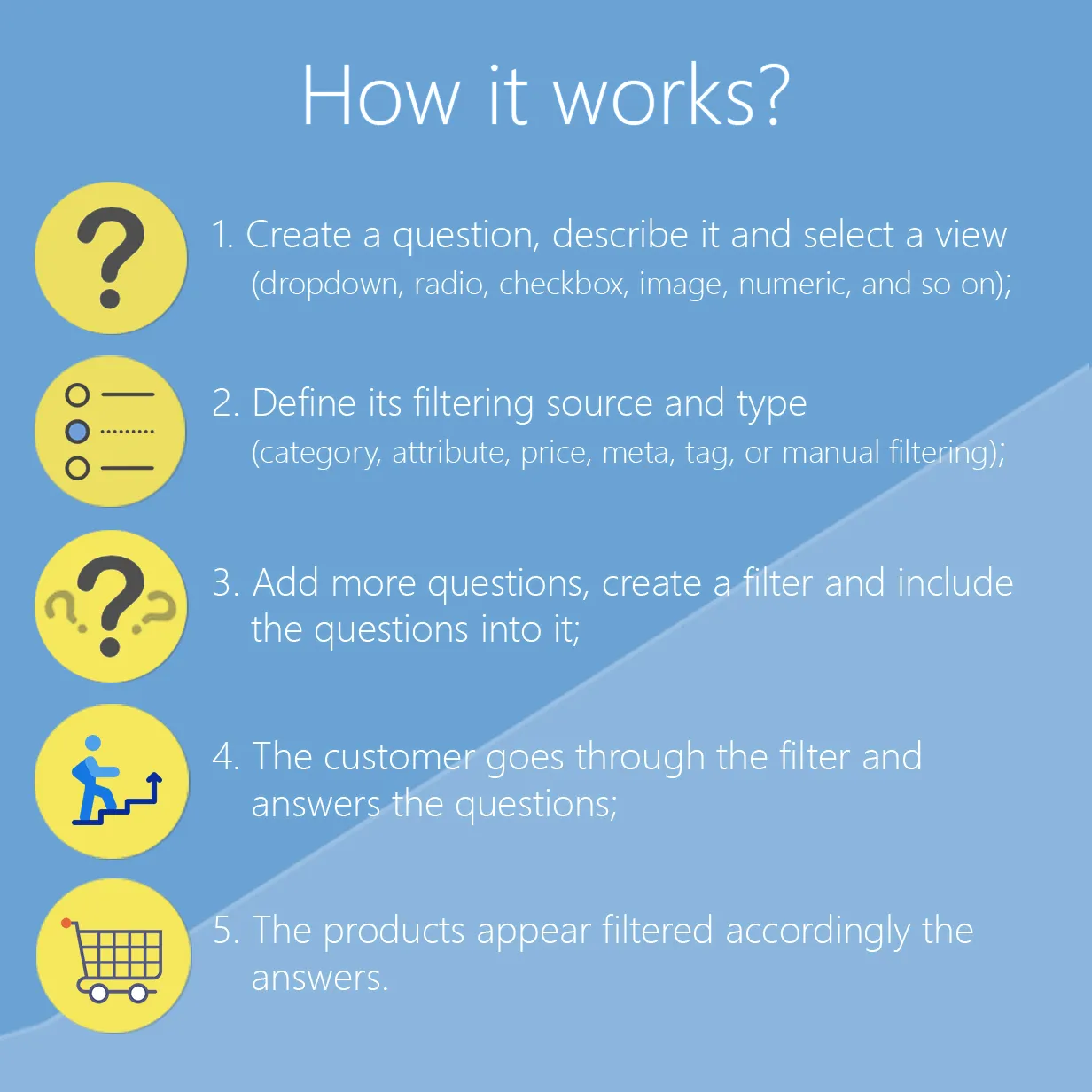
Choose the most appropriate workflow mode, such as free-walk steps, strict steps, single step, or sequence.
With a lot of settings for each specific question. Use individual question or bunches of questions per a step
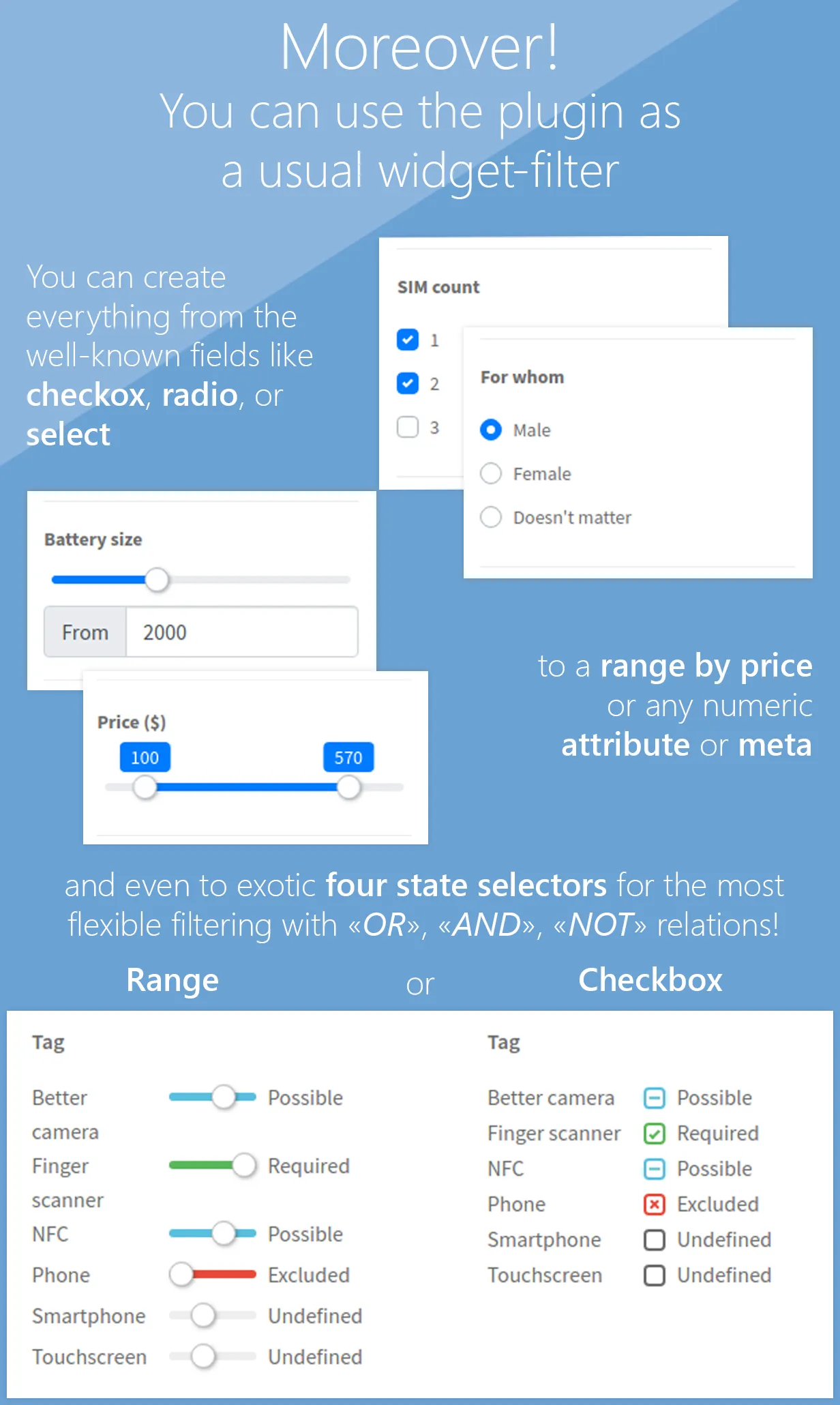
Apply filtering by any product entity, such as price, attribute category, tag, meta value, or manually selected products.
The next question types are allowed: select, radio, checkbox, button, image, number, range, multi-choice, or custom formula.
Use the filter shortcode to place it wherever you need it. Not only the sidebar using.
It’s possible to not redirect the customer to a shop page to show the filtering results.
Get anonymous statistics of filtering results to analyze your customers’ requirements.
Allow your customers to get a PDF file with the filtering results.
Show/hide a question according to other questions’ values.
The number of filters you can create is unlimited!
WooCommerce Step Filter is made with love and according to the needs of the real customers.
Started as a customer feature request of a filter with steps in 2016, after a lot of feedback, hard work, and regular improvements, the plugin has got its own shape, unique possibilities, and use-cases.
Most of the features were made jointly with the customers and for the customers!
Only logged in customers who have purchased this product may leave a review.

When will this plugin be compatible with HPOS? Currently its being marked as incompatible with that WooCommerce feature,
Thanks
Saskia

Hello Saskia,
HPOS support was added lately. Newest version should already have it 😉
The free version will be updated to be compatible too.
Maybe you have some older one?
Best regards, Alex

We currently have the step filter already installed on our site but I need to rewrite/redirect a few questions and answers. However, once the new question was setup it skips over what was added. Any help would be greatly appreciated.
Hello Michael,
Thank you for using the filter!
Could you message me at mail@troll-winner.com with your site URL to find out what’s going on there, please?
Best regards, Alex

Hi! I purchased the WooCommerce Step Filter a while back from CodeCanyon. The latest version from their download is 10.1.0. How can I get the newest version? Thanks!

Hi Chuck! Please, message me at mail@troll-winner.com with your license key. You can find it on the “Downloads” page of CodeCanyon.
Best regards, Alex

Hello one my client want https://www.ikea.com/addon-app/completesleep/needmap/m2/latest/?locale=en_US&uiPlatform=m2#needmap
this type of filter for his WooCommerce store so can i use this plugin please if yes how can i please give me suggestion so i will share this plugin details to client
Hello there!
I believe that’s possible to create such filter. There is some conditional logic according to the first question answer, and it’s also can be achieved.
Most important thing is how your products are filled and structured. If they have all of the data for filtering, that would be easy to implement 😉
Best regards, Alex

Hi, I tried the plugin in the sandbox and I would like more information before buying it.
Premise: I added a couple of sub-categories and sub-sub-categories in the products section, also in the question Fingerprint, I changed the Filter type to Category.
My question is: In the filter example free walk, at the question Fingerprint, is it possible to make the subcategories appear only after selecting the main category? And the same for sub-subcategories etc.?
Many Thanks.
Hi there!
Yep, that’s possible to achieve 🙂
In your case that’s necessary to create three questions to output zero-, first-, and second-level of categories. That’s possible to do using the “Start from the categories level” and “Max sub-categories level” settings:
https://step-filter.troll-winner.ru/docs/#question-settings-category
Then to output only sub-categories of the selected category use the “Category parent by a question answer” setting. Sub-categories which are not related to a selected one on a previous question will not be shown.
Best regards, Alex
= 11.0.0 =
Removed: Filter source settings
New: Filter steps setting
New: "Best match" ordering value
New: Results default "order-by" setting
New: Results PDF file name setting
New: Question "Show name" setting for image views
New: Question subtitle setting
Removed: Results PDF header/footer height settings
New: Results PDF spaces setting
Tweak: WooCommerce Products Wizard v12.0.0 compatibility
Tweak: Navigation views refactoring
Fix: Admin part bugs of setting modals
Fix: Formula-based questions bug
Tweak: Deep code refactoring

= 10.5.0 =
New: Export/Import feature
Fix: Values share via URL bug
Fix: Step-by-step mode values after the active step reset bug

= 10.4.2 =
Fix: Question dependencies and attribute value saving bug
Fix: Bind questions and fill answers via a link bug

= 10.4.1 =
Tweak: Action on click setting for numeric views
Tweak: Output WooCommerce Products Wizard filters before results
New: Shortcodes to output before and after shop products content
Fix: Lost styles of progress element
Fix: Min/Max values bug for attribute/meta numeric views

= 10.4.0 =
New: "Check variation attributes" question setting
New: ES modules of source scripts
New: Meta source for manual values
New: Output label for select views setting
New: Question category grid columns width setting
Removed: Question category grid columns number
Removed: Included scripts setting
Removed: noUiSlider script
Tweak: Possibility of multi-sources for manual values
Tweak: Code improvements and fixes
Tweak: Migrate to Bootstrap v5.3.3

= 10.3.0 =
New: Numeric prefix & suffix settings
Tweak: WooCommerce High-Performance order storage (COT) compatibility
Fix: Too long results URL bug
Fix: Spinner output with custom styles bug

= 10.2.0 =
New: Hide question setting
New: "Save state to URL" filter setting
Tweak: Split "bond questions" setting to filter => question
Tweak: Better compatibility with WooCommerce Products Wizard
Tweak: Code improvements and fixes

= 10.1.0 =
Fix: Submit filter on select tag click on macOS
Fix: Rare bug of PDF images with get attributes in link
New: Select with search question view
New: Trigonometric functions for the formula view
New: Nav button class setting
New: "Auto" and "None" values for nav action setting
New: Results button behavior setting
New: From/To numeric question settings
New: Sticky header/navigation/footer offset setting for different screen sizes
New: Share button URL shortcode
New: Spinner with loading progress bar
Tweak: Global input fields scope for formulas
Tweak: Code improvements

= 10.0.1 =
Tweak: Documentation update
Tweak: Better work with the browser history
Fix: Custom styles generation bugs

= 10.0.0 =
Removed: Controls sorting setting
New: Header/footer controls settings
New: WooCommerce Products Wizard integration
New: "Start" button for the description step
New: "Show progress" setting
Fix: Send current state hash via AJAX bug
Fix: Shop controls URL bug
Tweak: Code improvements

= 9.0.0 =
Removed: Show header/footer preliminary results settings
New: Show controls preliminary results settings
New: Sticky header/navigation/footer setting for different screen sizes
New: Controls sorting setting
New: "Reset filter on showing" setting
New: "Filter by the current opened term" setting
New: "Intersect with the other answers" manual product values setting
New: Inquiries statistic from/to dates to request
New: Inquiries export to CSV
New: Apply Bootswatch theme setting

= 8.3.0 =
New: Show header/footer preliminary results settings
New: Question category layout setting
Tweak: Code improvements

= 8.2.0 =
New: Sticky navigation/header/footer settings
New: "Results within type" setting
New: "Products per page for results within" setting
Tweak: Small code improvements
Tweak: Assets enqueue improvement
Fix: Attributes using with manual question answer bug
Fix: Reset button URL bug
Fix: Translation source bug
Fix: Admin scripts enqueue bug

= 8.1.1 =
Tweak: Small code improvements

= 8.1.0 =
New: Templates customization admin tool
New: Admin custom styles settings
New: Send current state hash via AJAX setting
New: "Thumbnail width" question setting
New: "Show term description" question setting
New: Product tag extra settings
New: Results description settings
New: Results PDF products number setting
New: Results PDF products columns setting
New: Results PDF additional CSS setting
New: Toggle navigation to mobile on screen size setting
Tweak: Migrate to Bootstrap v5
Tweak: Small code improvements
Fix: PDF bugs with PHP v8

= 8.0.0 =
Removed: Manual values filter by category/tag/attribute
New: Manual value filter by terms
New: Line horizontal nav view
Tweak: Line nav refactoring
Fix: Manual values question values bug
Fix: Action on click setting bugs

= 7.11.1 =
Fix: Manual values question bug with attributes selection

= 7.11.0 =
New: Show header/footer settings
Tweak: Results step controls improvements
Fix: Selected values active state bug

= 7.10.0 =
New: "Output calculated formula value" option
New: "Attribute value source" setting
New: "Category parent by a question answer" setting
Tweak: Dynamic value for the "Show count" option
Tweak: Better work with the native WooCommerce widget filters
Tweak: Admin UI improvements

= 7.9.0 =
New: Filtering by a formula
New: Results PDF
New: Controls class settings
Tweak: Small improvements

= 7.8.1 =
Tweak: Code improvements
Fix: Meta filtering bug
Fix: Category parent setting bug

= 7.8.0 =
New: Radio/checkbox button view
New: "Ignore filtering" question setting
New: Results tab thumbnail setting
New: More numeric view type settings
Fix: Preliminary results bug
Fix: Statistic results IDs bug
Tweak: Code improvements

= 7.7.1 =
Tweak: Code improvements

= 7.7.0 =
New: Extra query arguments setting
Fix: Value removing bug
Tweak: Code improvements

= 7.6.1 =
Fix: Small code bugs

= 7.6.0 =
New: More navigation views
New: More "Doesn't matter" value settings
New: "Enable value list" setting
Tweak: Code improvements

= 7.5.0 =
New: Empty results URL setting
New: Precise number question type
Fix: Question dependencies by empty attribute values admin bug
Fix: "Maximum products number in results setting" work bug

= 7.4.0 =
New: Min/max values selected setting
Tweak: Navigation behavior refactoring
Tweak: Save result products in the statistic
Tweak: noUiSlider update

= 7.3.0 =
New: Radio/checkbox chips view
Fix: Admin part bugs

= 7.2.0 =
New: Manual filters source by tag or attribute
New: Question label setting
New: "Store session in the DB" global setting
New: Support multi-choice questions in dependencies
Fix: Dependencies work bug
Fix: Bonded questions work bug

= 7.1.0 =
New: Possibility to use questions categories as steps
Fix: Better accessibility
Tweak: Different view of manual question products
Tweak: Code refactoring
Removed: "jquery.serializejson" script

= 7.0.0 =
Removed: "Include full styles file" global setting
New: "Styles including type" global setting
New: "Enable shop value list" setting
New: "Add empty value" drop-down questions setting
New: "Enable slider" numeric question setting
Fix: Accessibility bugs

= 6.7.0 =
New: "Instant redirect to the only result page" setting
Tweak: Out of stock product and variations handling

= 6.6.0 =
New: "Submit and go to results" action on click
New: Hidden nav view
Fix: Reset button in the widget mode bug

= 6.5.0 =
New: "Additional GET parameter" question setting
Fix: Widget mode results redirect bug

= 6.4.0 =
New: "Start from categories level" question setting
New: "Max sub-categories level" question setting
New: "Hide empty terms" question setting
New: "Unmet values behavior" question setting
Tweak: Documentation update
Fix: Search redirect bugs
Fix: Numeric between filtering bug
Removed: "Disable unmet values" question setting
Removed: "Include sub-categories" question setting

= 6.3.1 =
Tweak: Migrate to Bootstrap v4

= 6.3.0 =
New: Multi-choice values settings
New: Numeric questions step setting

= 6.2.1 =
Tweak: Code refactoring
Fix: Results button with the single-step mode bug

= 6.2.0 =
New: Shop controls visibility options
New: Shop repeat button
Tweak: "Disable unmet values" for numeric questions

= 6.1.0 =
New: Show "Next" button setting
New: "Show count" for terms option
Tweak: Code improvement

= 6.0.0 =
New: Included/excluded terms setting
New: "Disable unmet values" for each question
Fix: Question dependencies from a manual value bug
Fix: Navigation with dependant questions bug
Tweak: Support of categories tree for radio and checkbox views
Removed: "Disable unmet values" for filters

= 5.1.0 =
New: Bind with questions setting
New: "Sequence" form view
New: More controls settings
Tweak: "Doesn't matter" value in question dependencies
Fix: Products withing a filter pagination bug

= 5.0.0 =
New: Collecting of the inquiries statistic
New: Back button
Tweak: "Disable unmet values" setting work improvement
Tweak: Code refactoring

= 4.1.0 =
New: Custom meta filtering
New: Scripts including setting
Tweak: Documentation update
Fix: Multiple numeric fields bug

= 4.0.0 =
New: Support of using as a simple widget filter
New: View types: multi-choice checkbox and multi-choice range
Tweak: "Action on click" option for "select" view
Tweak: noUiSlider update

= 3.0.0 =
New: Question values relation setting
New: Preliminary results count option
New: Disabling of empty results values option
New: Action on click option
Fix: Category thumbnail in values bug
Fix: Steps and manual values visibility dependencies bug
Removed: Submit on click option

= 2.1.0 =
New: Category filter type parent setting
New: Submit on click option
Tweak: Question admin part improvement
Fix: Single step mode bugs

= 2.0.0 =
Removed: "No preselected values" option
New: Manual selection of pre-selected values
New: Category filter type
Tweak: Better work of dependencies and navigation

= 1.13.1 =
Fix: WooCommerce v3.6.1 bugs

= 1.13.0 =
New: Tags support
Fix: "Show results" button with within results bug

= 1.12.0 =
New: Question visibility dependencies option
New: "Show products within" option
Tweak: Manual values dependencies improvement
Fix: Rare filtering bug

= 1.11.0 =
New: "No pre-selected values" option
Tweak: WOOF plugin support
Tweak: Code refactoring

= 1.10.4 =
Tweak: RTL support
Fix: Code warnings

= 1.10.3 =
Tweak: Code refactoring
Fix: Admin bugs

= 1.10.2 =
Tweak: Admin part refactoring

= 1.10.1 =
Fix: Form ajax bug

= 1.10.0 =
New: Condition logic for manual values
Tweak: Core refactoring

= 1.9.0 =
New: Imaged fields alignment
Tweak: Better Bootstrap 4 support

= 1.8.0 =
New: Numeric fields slider
Tweak: Better fields view

= 1.7.0 =
New: Nav view setting
New: A few nav views
New: Single step mode

= 1.6.0 =
New: "Skip" button
New: Tabs action setting

= 1.5.0 =
New: Value images
New: Step-by-step mode
Fix: Rare filtering bug
Fix: "Doesn't matter" value bug

= 1.4.0 =
New: "Maximum products number in results" setting
Tweak: Code refactoring

= 1.3.0 =
New: "Scroll to top" option
Fix: Rare redirect bugs fix

= 1.2.0 =
New: Results url setting

= 1.1.0 =
New: Shop page filter controls
Fix: Work bugs with a plain permalink structure

= 1.0.1 =
Fix: The first step notices

= 1.0.0 =
Initial release



For Design Quality
https://codecanyon.net/ratings/3470281
For Customer Support
Amazing plugin and support is the best i’ve found. Alex worked through lots of our requests with no hesitation and always welcomed with a friendly email. the steps filter is excellent and has so many features, It’s by far the best step filter plugin for woocommerce, we know as we literally tried them all before finding this plugin. 🙂
https://codecanyon.net/ratings/3411599
For Customizability
Number 10 and a great selection widget app. Their support is excellent, thank you.
https://codecanyon.net/ratings/3406839
For Customer Support
For support for sure… the best of the best here! But, the plugin is very good too :DThanks for all mr Troll Winner!
https://codecanyon.net/ratings/3337228
For Feature Availability
I have bought several similar plugins but none of them come close to this one. The features are absolutely flexible and intuitively designed after a little familiarization. Also, feedbacks and suggestions are quickly perceived and implemented! Many thanks to troll_winner for the quality of his work and this great plugin!
https://codecanyon.net/ratings/3356608
For Customer Support
Perfect support and very good plugin
https://codecanyon.net/ratings/3221935
For Customer Support
A good plugin with a lot of customizations possibilities and the best support I never had with !More possibilities for style customizations in the future could be a good thing !Thanks
https://codecanyon.net/ratings/3251963
For Customer Support
I searched high and low for a step filter solution. Not only did the plugin do the job. Easy to understand, but a pleasant surprise was the amazing (actually the best ever) customer support. Highly recommend plugin.
https://codecanyon.net/ratings/3307855
For Customer Support
Great plugin, outstanding support. Customizable.
https://codecanyon.net/ratings/3050676
For Flexibility
https://codecanyon.net/ratings/3153014